Have you ever zoomed into a photo and suddenly seen small squares instead of smooth detail? Those squares are pixels, and when counted in the millions, they’re called megapixels. This unit is often highlighted in smartphone specs and also influences print resolution. But do higher numbers automatically mean better quality? This article explains what megapixels really measure and when they actually matter.
Megapixel explained briefly
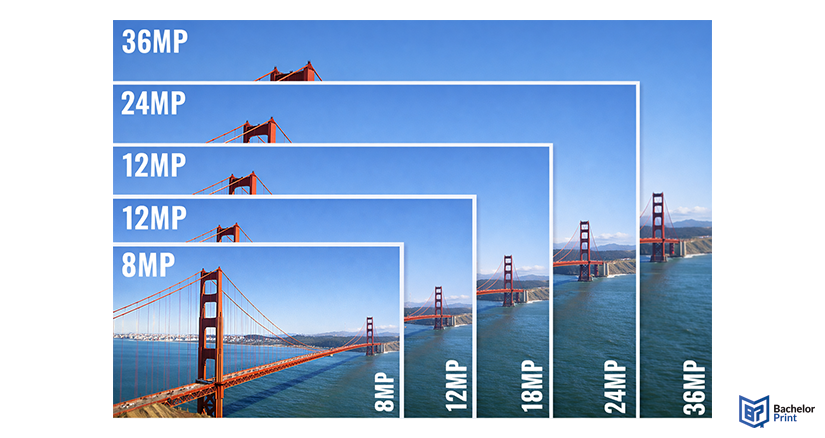
A megapixel equals one million pixels. The more megapixels an image has, the more detail it can store. However, image quality depends on additional factors like sensor size and lens quality.
Definition: Megapixel
A megapixel (MP) is a unit that measures the total number of pixels in an image.
- 1 MP = 1,000,000 pixels
- Used to describe camera sensor resolution
- Indicates how much detail an image can theoretically capture
Formula
Megapixels = Image width in pixels × Image height in pixels ÷ 1,000,000
Resolution standards
Format
Pixel dimensions
Megapixels
HD (1080p)
1920 × 1080
2.1 MP
4K UHD
3840 × 2160
8.3 MP
5K
5120 × 2880
14.7 MP
8K UHD
7680 × 4320
33.2 MP
Megapixel vs. pixel
A pixel is the smallest unit of a digital image. A megapixel describes the total number of those units.
Overview
Pixel
Megapixel
Definition
Smallest image unit
One million pixels
Role
Holds color & brightness data
Indicates total image resolution
Measurement
Width × height (e.g., 3000×2000)
Sensor rating (e.g., 24 MP)
Impact
Affects fine detail smoothness (PPI)
Affects print size & cropping
More megapixels = better quality
Not automatically. Marketing often equates high MP with better photos, but image quality depends on multiple technical variables.
Other critical factors
Higher MP ➜ larger files ➜ more storage and processing power needed.
A sensor can only capture detail that the lens resolves. Poor optics waste high MP potential.
Larger sensors with fewer, bigger pixels often perform better in low light than small sensors packed with many tiny pixels.
When more megapixels help
- Heavy cropping after shooting
- Fine texture capture in ideal lighting
- Large prints (posters, exhibition prints)
Why more isn’t always better
- Slower workflow due to large files
- Lens limitations reduce effective detail
- Low-light noise from tiny pixels on small sensors
- Social media compression makes extra MP irrelevant
PDF printing at BachelorPrint from $0.10
- Upload your files & order printed PDFs in minutes
- Secure online PDF printing service with reliable delivery
- High-quality prints from any PDF, including reports & more
Learn more!
Megapixels & printing
Megapixels determine how large you can print an image at a given quality level.
Megapixels
Max high-quality print (300 PPI)
12 MP
approx. 14 × 9 in
24 MP
approx. 20 × 13 in
36 MP
approx. 24 × 16 in
50 MP
approx. 28 × 19 in
More megapixels allow larger prints without visible pixelation, provided the image is clear and well-exposed.
What does PPI mean?
PPI (pixels per inch) describes how many image pixels are printed within one inch of paper. Higher PPI means finer detail and smoother results. A more in-depth explanation is available in our separate article on PPI.
FAQs
Exactly 1,000,000 pixels.
Only for large prints or cropping. For everyday use, differences are often minimal, and thus a higher MP value is obsolete.
It refers to one million pixels and describes total image resolution.
Approximately 8.3 megapixels (3840 × 2160).
