In print production, paper folding shapes how information is structured and revealed. The Z-fold is a common folding technique that divides a sheet into equal panels, creating a zigzag layout that opens sequentially. It is widely used for brochures, flyers, and other marketing materials. Its panel design makes it suitable for step-by-step communication.
Definition: Z-fold
A Z-fold is a paper folding method in which a sheet is folded twice in opposite directions, creating three panels of equal size. When viewed from the side, the folded sheet forms a zigzag shape resembling the letter “Z.”
Unlike roll-style folds, the panels do not tuck into each other. Instead, the document opens and closes in a continuous motion similar to an accordion, revealing each section sequentially from left to right.
- Zigzag fold
- Accordion-style fold (when limited to three panels)

Z-fold vs. C-fold vs. accordion fold
Although these folds are often confused, their structure and behavior differ:
Z-fold
Two parallel folds in opposite directions. Panels are equally wide and open in a zigzag pattern.
Two folds in the same direction. One panel folds inward, and the final panel wraps around it.
Accordion fold
A general term for multiple alternating folds. An accordion fold can also have 6, 8, or more panels.
How to Z-fold
To Z-fold paper, follow these steps:
Step-by-step process
- Lay the sheet flat on a clean surface in the orientation you want (portrait or landscape).
- Divide the sheet into three equal sections (lightly mark the fold points if needed).
- Make the first fold by folding one outer third inward to the center, then crease firmly.
- Flip the remaining third in the opposite direction so the sheet forms a zigzag “Z” shape.
- Sharpen the creases along both fold lines (or score first for heavier stock) with a folding bone.
- Check alignment so all panel edges are flush and the fold opens smoothly without twisting.

Products
Below are common printed products that frequently use the Z-fold format:
Price lists
Each panel can represent a category or pricing tier allowing customers to compare information at a glance.
Menus
Frequently used in hospitality settings to separate starters, main courses, and beverages into clearly organized panels.
Maps & guides
The accordion-style opening allows larger visuals or route plans to span across panels while remaining foldable and portable.
Brochures
Ideal for step-by-step storytelling, company presentations, or product overviews. The zigzag opening supports sequential information and guided reading.
Flyers
Perfect for compact promotional materials that still require structured sections, such as event programs, service descriptions, or campaign highlights.
Affordable document printing from $0.10
- Crisp text, vibrant colors & multiple paper choices
- No need to visit a shop; simply order online anytime
- Print documents, copies & reports with professional quality
Learn more!
Common uses
The Z-fold is commonly used in commercial printing when information should be presented in a clear, step-by-step sequence while remaining compact. Because all panels are equal in size and unfold in a continuous zigzag motion, it supports structured storytelling and logical content flow.
The equal-width structure makes the Z-fold ideal for documents that must present categorized information without visual hierarchy distortion caused by narrower panels.
➜ Suitable for professional materials where clarity and structured segmentation are priorities.
The alternating fold structure naturally supports chronological or procedural communication.
➜ Ideal for content that benefits from a guided, panel-by-panel reading sequence.
Because the sheet opens fully without overlapping panels, Z-folds work well for designs that span across multiple sections.
➜ Allows large visuals to remain continuous while still folding into a compact format.
A folding method that creates six equal panels through two alternating folds, allowing content to unfold in a smooth zigzag motion without nested sections.
➜ Effective for campaigns that require controlled information flow and equal design space on each panel.
Panel layout
Understanding panel sequencing is essential when designing a Z-fold. Because the folds alternate directions, the reading order differs from a C-fold. All panels are equal in width, but their position changes once the sheet is folded.
- Side A (outside): Shows the front and back panels when folded
- Side B (inside spread): Forms a continuous strip when fully opened
When folded with six panels
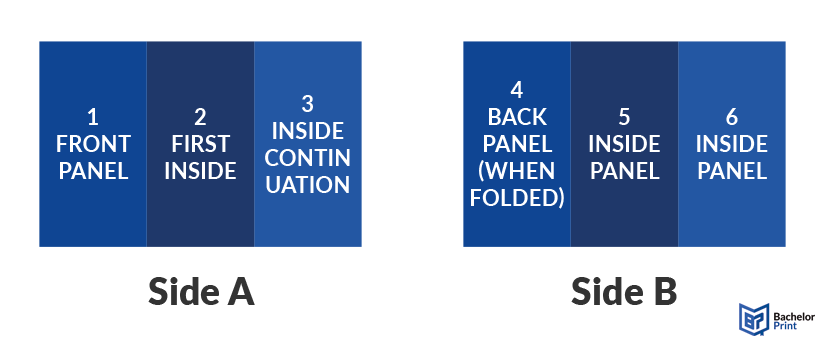
When you lay out your sheet flat, the panels are numbered from left to right.
- Side A (outer side, read left ➜ right when fully opened): Panels 1 – 2 – 3
- Side B (reverse side, read left ➜ right when fully opened): Panels 4 – 5 – 6
When fully folded, the visible panels are:
- Front: Panel 1
- Back: Panel 4
Reading order when fully opened (laid flat):
Panel 1 ➜ Panel 2 ➜ Panel 3 ➜ Panel 4 ➜ Panel 5 ➜ Panel 6
Panel number
Position when folded
Typical purpose
1
Front panel
Headline, key visual, branding
2
First inside
Introduction or opening section
3
Inside continuation
Core content or features
4
Back panel
Contact information, CTA, legal notes
5
Inside panel
Supporting information
6
Inside panel
Additional details or highlights
Pros & cons
The Z-fold offers many advantages, but it also comes with limitations.
Pros
- Opens in one smooth “zip” motion
- No nested panels; lies flat when open
- Suitable for full-length, continuous designs
- Equal panel widths simplify layout planning
Cons
- Alternating folds may spring open
- Edges may fray or become dog-eared
- Not suitable for holding loose inserts
- Requires wafer seals for secure mailing
Layout tips
Careful layout planning ensures that a Z-fold prints and functions as intended. Pay attention to reading flow, fold areas, and stock selection during design.
✅ Panel logic
Treat each panel as an individual page for quick-read content, but use the reverse side for continuous spreads such as maps or large visuals.
✅ Paper weight
Avoid stock heavier than 100 lb cover unless it is pre-scored. Without scoring, alternating folds can cause visible ink cracking along the edges.
✅ Reading direction
Design content to flow horizontally across panels. Because the Z-fold opens in a zigzag motion, readers naturally follow the reveal from left to right.
✅ Orientation check
Remember that the front and back panels sit on opposite ends of the flat sheet. Confirm alignment to avoid upside-down covers or misplaced contact details.
✅ Bleed & safe zone
Use a minimum 1/8″ bleed and keep text at least 1/4″ away from fold lines to prevent important elements from disappearing into creases.
Printing services at BachelorPrint
- Individual solutions & personal support
- High print quality & fast production times
- Wide range of print products for every need
Learn more!
Considerations
Z-folding involves specific production and handling factors. Proper folding direction, material choice, and finishing techniques help prevent structural or visual issues.
❌ Ink cracking
Heavy ink coverage over fold lines can crack and expose white fibers. Pre-scoring or applying an aqueous coating helps protect the printed surface.
❌ Stack stability
Because folds alternate, finished pieces can stack unevenly. Careful packing or alternating lift patterns help maintain balance.
❌ Grain direction
Always fold with the paper grain. Folding against it breaks fibers and leads to rough, uneven creases.
❌ Paper thickness
Very thick stock may resist staying closed and spring open. Select a weight that balances durability with fold retention.
❌ Folding accuracy
When folding manually, the first fold must be perfectly square. Any deviation will compound and distort the final zigzag alignment.
FAQs
A Z-folded paper is a sheet folded twice in opposite directions, creating three equal panels per side that form a zigzag shape when viewed from the edge.
Divide the sheet into three equal sections, fold one third inward, then fold the opposite third in the reverse direction to create a “Z” shape.
Not necessarily. The tri-fold simply means the sheet is folded into three sections. A Z-fold uses alternating folds, while many tri-folded brochures use a C-fold (roll fold) where one panel tucks inside another.
