When talking about US paper sizes, Half Letter might not be the first one that comes to mind. However, this small paper size has many helpful uses and, as the name entails, measures exactly half of the standard paper size Letter. In this article, we’ll discuss its uses, how to print it, and compare its dimensions to Letter and A5.
Definition: Paper size Half Letter
Half Letter measures 5.5 × 8.5 in (140 × 216 mm) and belongs to the loose paper sizes, which are used primarily in North America. It can also be referred to as Half Size, Memo, Statement, or Stationery as it can be used for exactly that.
| Paper size | Dimensions (in) | Dimensions (mm) |
|---|---|---|
| Half Letter | 5.5 × 8.5 in | 140 × 216 mm |
| Letter | 8.5 × 11 in | 216 × 279 mm |
| Legal | 8.5 × 14 in | 216 × 356 mm |
| Tabloid | 11 × 17 in | 279 × 432 mm |
| Ledger | 17 × 11 in | 432 × 279 mm |
Affordable document printing from A$0.16
- Crisp text, vibrant colors & multiple paper choices
- No need to visit a shop; simply order online anytime
- Print documents, copies & reports with professional quality
Learn more!
Uses
Half Letter can be used for many things. The most common uses are listed below.
- Booklets
- Flyers
- Leaflets
- Memos
- Menus
- Notes
- Planner pages
- Statements
- Stationary
- Worksheets
Half Letter vs. Letter
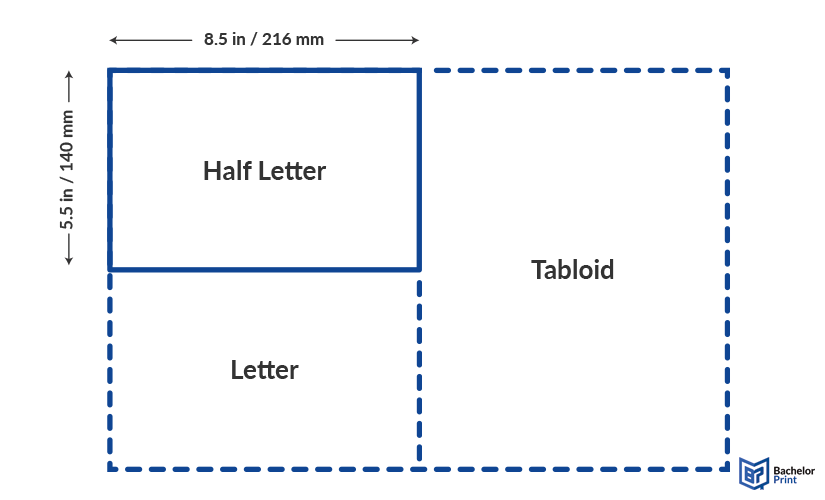
Half Letter (5.5 × 8.5 in or 140 × 216 mm) measures exactly half of Letter paper (8.5 × 11 in or 216 × 279 mm). This means that when you cut a Letter paper in half, you’ll get two Half Letter papers. This phenomenon is comparable to the internationally used A series, where A5 paper dimensions equal half of A4 paper dimensions.
Printing on Half Letter
When you want to print a Half Letter document and don’t have a Half Letter paper at hand, there are two options available:
PDF: Go to the print settings (Ctrl + P or Cmd + P), and under “Page Sizing & Handling,” select “Multiple.” From there, set “Pages per sheet” to 2 and the “Page Order” to “Horizontal.” Make sure that the “Orientation” is set to “Landscape.”
Word: To print a Half Letter paper on Letter, go to the “Layout” tab and click on the small arrow in the “Page Setup” corner. Under “Margins,” find “Multiple pages” and select “2 pages per sheet” and “Landscape.” When you print, Word will put pages 1 and 2 on the first physical sheet of paper.
Half Letter vs. A5 paper
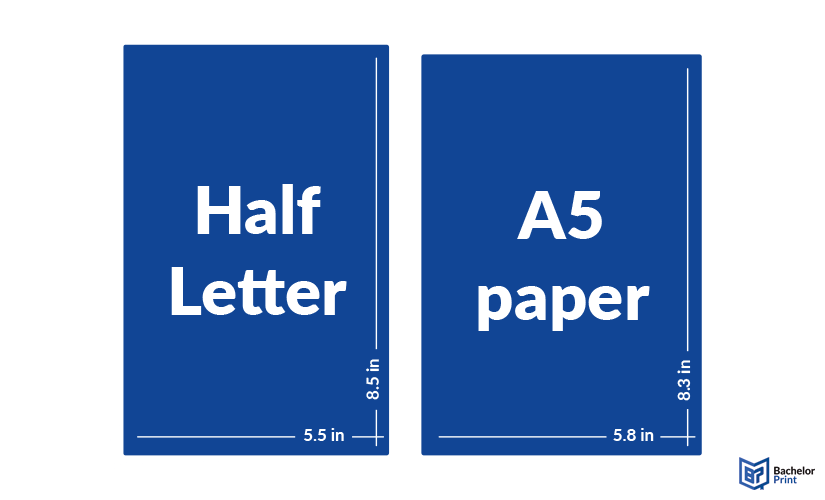
Compared to A5, Half Letter is slightly thinner and slightly taller. By how much? Let’s compare them below.
Half Letter
Size: 5.5 × 8.5 in (140 × 216 mm)
Usage: North America, Chile & Philippines
Half the size of Letter
A5
Size: 5.8 × 8.3 in (148 × 210 mm)
Usage: Global
Half the size of A4 paper
A5 printing at BachelorPrint from A$0.14
- Smaller prints in A5 size for flyers or cards
- Quick and easy configuration in our online shop
- Select your preferred paper weight, finishing options & add-ons
Learn more!
FAQs
Half Letter size is a North American paper size that measures 5.5 × 8.5 in (140 × 216 mm). It’s typically used for planners, memos, and statements.
No, they are not the same. While they are similar in size with Half Letter measuring 5.5 × 8.5 in (140 × 216 mm) and A5 paper measuring 5.8 × 8.3 in (148 × 210 mm), the former is used in North America, whereas the latter is used globally.
Half of an 8.5 × 11 paper (also known as Letter size) is 5.5 × 8.5 in, which is called Half Letter.
To print on Half Letter, your best choice is printing on Letter paper and changing your settings.
PDF: Go to the print settings (Ctrl + P or Cmd + P), under “Page Sizing & Handling,” select “Multiple.” From there, set “Pages per sheet” to 2 and the “Page Order” to “Horizontal.” Make sure that the “Orientation” is set to “Landscape.”
Word: Go to the “Layout” tab and click on the small arrow in the “Page Setup” corner. Under “Margins,” find “Multiple pages” and select “2 pages per sheet” and “Landscape.”
