
CMYK is the standard colour system used in printing and plays a central role whenever digital designs are transferred onto paper. Because inks absorb and reflect light differently, colors can look vivid on a monitor but appear changed once printed. This article explains what CMYK means, how it works in practice, how it differs from other colour systems, and how to correctly prepare RGB designs for printing.
CMYK explained briefly
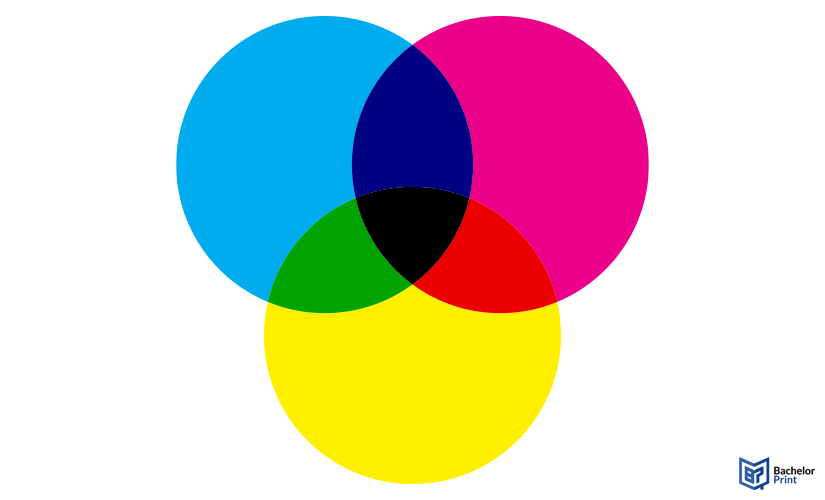
CMYK is the standard subtractive colour system used in printing. It’s based on the inks cyan, magenta, yellow, and key (black). Here, colors are created by layering ink dots that absorb light. Printed colors often differ from the RGB colors seen on screens, which is why files must be converted before printing.
Inhaltsverzeichnis
Definition: CMYK
CMYK is a subtractive colour model and the most widely used colour system for print colour reproduction. It is specifically designed for printing processes, where ink is applied to a light surface to create colors.
The term CMYK stands for the four printing inks
- Cyan
- Magenta
- Yellow
- Key (black)
By layering these in different proportions, printers can create thousands of distinct colors, from light pastels to deep, dark tones.
Why is the black called “key”?
The black ink in CMYK is called “key” because it traditionally played a central role in defining and aligning the entire printed image.
One practical reason is to avoid confusion with “B”, which is already commonly used to refer to blue in other colour systems such as RGB. Beyond naming conventions, however, the term key has historical and technical roots in printing.
- Key plate: Contained the most important visual information, like fine lines, details, and contrast, in traditional printing. This plate defined the structure of the image.
- Alignment: The key plate aligned the other three plates (CMY) so they would overlap precisely. Because black ink produced the sharpest edges and highest contrast, it was ideally suited for this role.
As a result, black became the reference ink that anchors the entire print image which is why it is still labelled K in the CMYK colour system.
High-quality colour copies from just A$0.28
- Choose from different paper formats & paper weights
- Configure finishing options & add any extras you need
- Easy online ordering process with delivery to your doorstep
Learn more!
How it works
The CMYK colour system is designed to reproduce colors accurately on paper by controlling how ink interacts with light. Understanding this helps explain why printed colors behave differently from colors seen on a screen.
Subtractive colour model
CMYK is based on a subtractive colour model, meaning colors are created by removing (subtracting) portions of light rather than emitting it. As the inks are printed onto the page, they absorb specific wavelengths of light. The remaining light is reflected back to your eyes, which is how the final print colour is perceived. The more ink that is applied, the less light is reflected, resulting in darker colors.
Ink layering & dot patterns
Printers apply dots of CMYK ink in varying sizes and patterns. These dots overlap and change in density to create the impression of thousands of different colors and gradients. This method is used across common printing technologies, including inkjet printers and laser printers, making CMYK the universal standard.
Why add black (K)?
In theory, combining 100% cyan, magenta, and yellow should produce black. In practice, this mixture usually results in a dark brown or muddy tone rather than a true black.
Adding a dedicated black ink (K) solves this problem by offering several advantages:
✅ Sharper text and fine details
✅ Truer black ones with higher contrast
✅ Reduces ink usage, which lowers printing costs
CMYK vs. CMY
CMYK and CMY are closely related colour systems. Both are based on the same three primary inks, cyan, magenta, and yellow, but the key difference is the addition of black in CMYK.
Comparison
CMYK
CMY
Color model
Subtractive
Subtractive
Inks used
Cyan, Magenta, Yellow, Black (Key)
Cyan, Magenta, Yellow
Black reproduction
Dedicated black ink
Less deep black
Print quality
Higher contrast and sharper details
Limited contrast and depth
Ink efficiency
Efficient usage
High consumption
Typical use
Modern professional printing
Theoretical or early printing
Practical difference
In theory, CMY can produce black by combining all three inks at full strength. In real-world printing, however, this results in a dull, muddy tone and excessive ink usage. CMYK solves this limitation by adding a dedicated black ink.
CMYK vs. RGB
CMYK and RGB are two fundamentally different colour systems designed for different output mediums. Understanding their differences is essential when preparing designs for printing.
Comparison
CMYK
RGB
Color model
Subtractive
Additive
Color creation
Ink absorbs light
Light is emitted
Medium
Printed materials
Screens and displays
Colors used
Cyan, Magenta, Yellow, Black (Key)
Red, Green, Blue
Color range
Smaller, print-limited
Larger, more vibrant
Typical use
Printing
Web, monitors, digital media
Practical difference
RGB creates colors by combining light, which allows screens to display very bright and saturated colors. CMYK, on the other hand, produces colors by absorbing light with ink on paper, resulting in a more limited colour range.
Because of this difference, colors that look vivid on a screen may appear duller when printed. This is why designs intended for print should be created or converted to CMYK before printing to ensure predictable and accurate results.
RGB to CMYK
Most designs are created on screens, but printing requires CMYK. Converting RGB files to CMYK is therefore a crucial step. Because CMYK has a smaller colour range than RGB, some colors may shift during conversion.
This is the standard method for raster images such as photos.
-
Direct mode change
- Open your file and go to Image ➜ Mode ➜ CMYK Color
-
Advanced control (recommended)
- For better colour accuracy, use Edit ➜ Convert to Profile
- Select an appropriate CMYK profile (e.g., GRACoL2006 or U.S. Web Coated (SWOP) v2).
- Afterwards, set the Intent to Relative Colorimetric.
Best suited for vector designs, logos, and layouts.
-
Document colour mode
- Go to File ➜ Document Color Mode ➜ CMYK Color
-
Convert existing elements
- Even after changing the document mode, some objects may still be in RGB.
- Select all objects (Cmd/Ctrl + A) and go to Edit ➜ Edit Colors ➜ Convert to CMYK
Canva does not allow designing directly in CMYK, but conversion is possible during export.
- Click Share ➜ Download
- Choose PDF Print as the file type
- Under Color Profile, select CMYK (requires Canva Pro).
If you already have an RGB-based PDF, you can convert it for print production.
- Go to Tools ➜ Print Production ➜ Convert Colors
- Choose a CMYK Profile and apply it to the document.
If you don’t have professional software, web-based tools can help with basic conversions:
- RGB2CMYK: Upload images and choose professional ICC profiles
- PDF2CMYK: Designed specifically for converting existing PDF files
- RapidTables: Useful for converting individual RGB and CMYK colour values rather than entire files
PDF printing at BachelorPrint from A$0.16
- Upload your files & order printed PDFs in minutes
- Secure online PDF printing service with reliable delivery
- High-quality prints from any PDF, including reports & more
Learn more!
FAQs
Neither colour system is better overall because they serve different purposes.
- RGB is designed for digital screens that emit light.
- CMYK is optimized for print colors create with ink on paper.
CMYK stands for Cyan, Magenta, Yellow, and Key (Black).
The letter “K” stands for key. Historically, black ink was used as the key plate in printing, providing sharp details and guiding the alignment of the other colour plates. Using “K” also avoids confusion with “B,” which often represents blue.
RGB files can be converted to CMYK using design software such as Adobe Photoshop, Adobe Illustrator, or Adobe Acrobat Pro. Many tools allow you to select a CMYK colour profile to ensure accurate print results.
