Landscape format is one of the most important printing terms in document design and production. It describes a horizontal page orientation. While it offers clear visual advantages for wide layouts, it also requires specific considerations in structure, binding, and finishing. Understanding how landscape format functions in print ensures both aesthetic and technical precision.
Definition: Landscape format
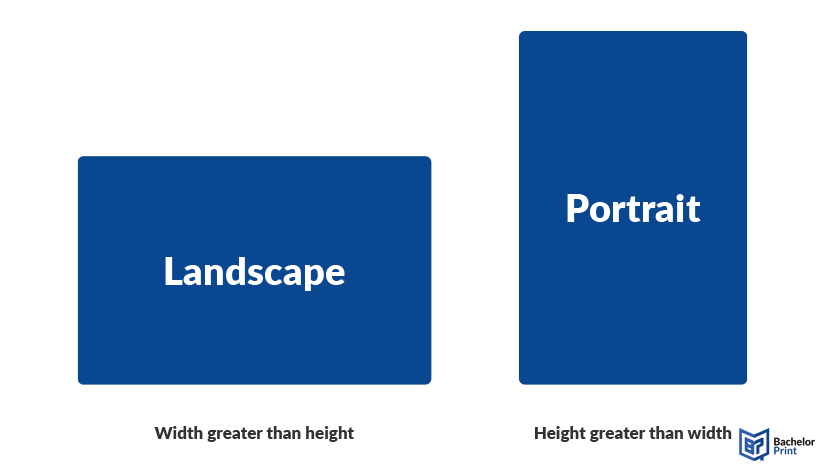
Landscape format refers to a horizontal page or image orientation in which the width exceeds the height. Unlike portrait orientation, the longer edge runs horizontally, creating a wider visual axis.
This format is primarily used to capture expansive scenes such as horizons, cityscapes, panoramic views, or group photographs, as it mimics the natural horizontal field of vision (FOV) of the human eye. Because of this visual logic, landscape format plays a significant role in media production, photography, digital displays, and printed documents, particularly when wide layouts improve clarity and impact.
A3 printing for £0.13 at BachelorPrint
- Quickly print your A3 papers online
- Choose from a variety of finishes & extras
- Vibrant A3 poster printing on premium paper
Learn more!
Landscape vs. portrait format
Choosing the correct orientation depends on content structure, context, and intended use.
Structural difference
Width-to-height ratio
Landscape format has a greater width than height, while portrait format has a greater height than width.
Visual axis and reading flow
Landscape emphasizes horizontal flow, while portrait supports vertical reading.
Practical implications
When landscape improves usability:
- Panoramic images
- Large-format displays
- Presentations and slide decks
- Wide tables and comparison charts
When portrait is more efficient:
- Books and reports
- Text-heavy documents
- Standard office printing
- Filing and archiving systems
Quick comparison
Feature
Landscape
Portrait
Orientation
Horizontal
Vertical
Visual emphasis
Width
Height
Typical uses
Dimensions
Landscape format is not defined by a single size but by orientation. It can be applied to various aspect ratios and standardized paper formats.
Common aspect ratios
- 16:9 = Industry standard for widescreen video, presentations, and modern displays.
- 3:2 = Traditional ratio of 35mm film and most DSLR camera sensors.
- 4:3 = Standard of older television sets and some digital cameras.
- 91:1 = Recommended ratio for landscape posts on Instagram.
DIN/ISO paper sizes
Landscape orientation can be applied to all ISO A-series paper sizes by rotating the sheet 90 degrees.
- A3 landscape = 420 × 297 mm
- A4 landscape = 297 × 210 mm
- A5 landscape = 210 × 148 mm
Commonly used for brochures, charts, and presentation handouts.
US sizes
In North America, landscape orientation is based on ANSI paper sizes.
- Letter landscape = 11 × 8.5 inches
- Ledger landscape = 17 × 11 inches
Letter landscape is typical of presentations and internal documents, while tabloid landscape is frequently used for posters, spreads, and large-format layouts.
How to change orientation in MS Word
Microsoft Word allows you to switch between portrait and landscape orientation for an entire document, specific pages, or from a defined point onward.
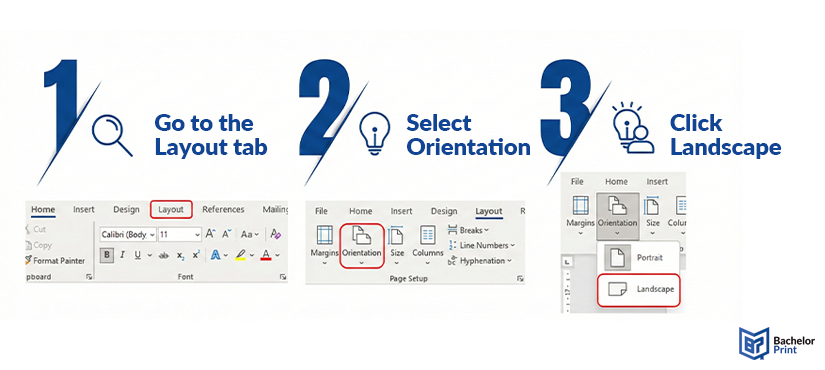
To change the orientation of the full document:
- Go to the Layout tab
- Select Orientation
- Click Landscape
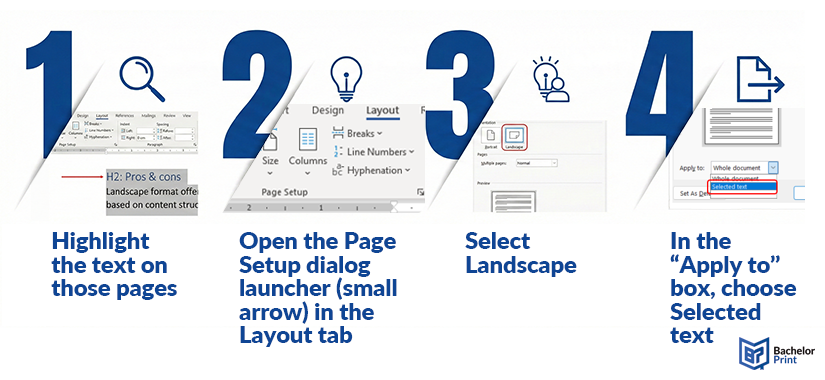
If only certain pages should appear in landscape format:
- Highlight the text on those pages
- Open the Page Setup dialogue launcher (small arrow) in the Layout tab
- Select Landscape
- In the “Apply to” box, choose Selected text
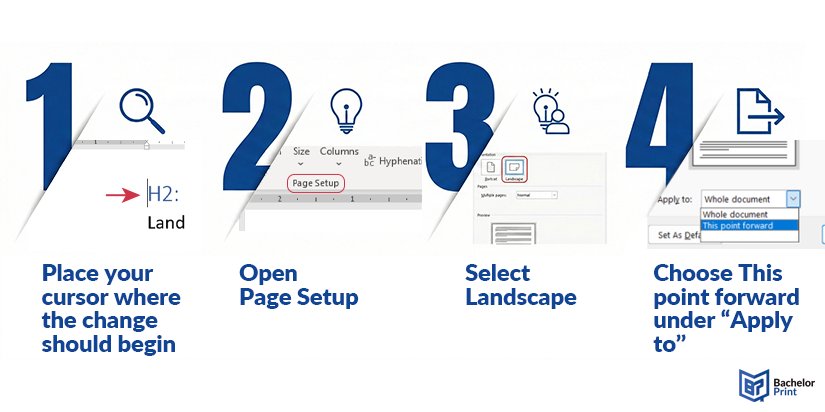
To change orientation starting at a specific location:
- Place your cursor where the change should begin
- Open Page Setup
- Select Landscape
- Choose This point forward under “Apply to”
Orientation changes work on a section level, not a page level. Missing or misplaced section breaks are the most common cause of formatting errors. After inserting section breaks, headers and footers may become unlinked from previous sections, and page numbering can reset unexpectedly. Additionally, ensure that your printer driver supports automatic rotation; otherwise, content may scale incorrectly or be cropped.
Note: Always review the entire document layout carefully after modifying page orientation.
Print production
Landscape format requires more deliberate planning than portrait orientation because layout logic, binding mechanics, and finishing processes are directly affected. Below are the key production factors.
Bleed and margins
Wide formats often require careful bleed setup, especially in spreads. Insufficient inner margins may lead to content disappearing into the binding area.
Horizontal visual flow
Landscape layouts guide the reader’s eye from left to right. This orientation supports timelines, panoramic imagery, data comparisons, and presentation-style storytelling.
Image-to-text balance
Landscape format tends to favour visual dominance. If text blocks become too wide, line length increases and readability decreases. Modular layouts with columns, grids, or segmented content blocks improve structure and legibility.
White space management
The extended horizontal axis can quickly create visual imbalance. Margins, gutters, and spacing must be distributed intentionally to prevent a stretched or underutilized appearance.
Page turning logic
Landscape orientation can feel unintuitive if the binding direction does not align with reader expectations. Proper sequencing and preview checks are essential before print.
Spiral binding direction
Wire or spiral binding can be placed on the long edge or the short edge. Top-edge binding transforms the document into a flip-style presentation format.
Short-edge vs. long-edge binding
- Long-edge binding behaves like a traditional book in landscape orientation.
- Short-edge binding flips upward, similar to a calendar.
The intended reading direction must be clearly defined before production.
Note: Paper grain direction should align with the binding edge to avoid cracking along the fold.
Brochure panels
Horizontal panels support sequential storytelling across spreads and multi-panel layouts.
Large-format applications
In oversized prints, landscape orientation maximizes wall coverage and improves visibility from a distance.
Gatefold and Z-fold suitability
Landscape sheets are particularly effective for gatefolds and Z-folds because the horizontal axis enhances reveal effects.
11×17 printing at BachelorPrint
- Large format print for posters, plans & presentations
- Fast turnaround & reliable delivery right to your door
- Brilliant color quality & details on premium paper from £0.13
Learn more!
Large-format printing
Landscape orientation is particularly dominant in large-format printing, where horizontal space enhances visibility and impact.
Because most viewing environments are horizontally oriented, such as stages and storefronts, landscape format typically delivers stronger visual presence and improved viewing distance performance at scale.
Pros & cons
Landscape format offers advantages but also introduces limitations. The decision should therefore be based on content structure and intended use.
Pros
- Ideal for wide visuals
- Natural fit for presentations
- Strong for data-heavy layouts
Cons
- Binding complexity
- Filing and archiving challenges
- Less ergonomic for long text blocks
When to choose
Landscape format should be selected when width enhances clarity, context, or visual impact. The orientation is most effective when horizontal space supports the message rather than merely changing the page layout.
Photography & visual composition
- Group photos (weddings, teams, families)
- Horizontal motion (action scenes, cyclists, racing cars)
- Nature and landscapes (mountain ranges, horizons, sunsets)
- Environmental context (background as important as the subject)
Landscape captures spatial relationships more naturally, especially when width conveys scale or atmosphere.
Viewing environment & context
- Viewing distance (large banners, billboards)
- Screen optimization (laptops, TVs, projectors)
- Natural perception (mimics the human eye’s natural horizontal FOV)
In display-heavy environments, landscape often aligns better with architectural space and screen proportions.
Data & information design
- Dashboards
- Presentations
- Data-heavy layouts
Wide formats accommodate multi-column structures, comparisons, and parallel information streams without excessive vertical scrolling or page breaks.
➜ Landscape creates a feeling of stability, tranquility, and room to breathe. Furthermore, it evokes the look of professional film and high-end video production.
FAQs
Not necessarily. 16:9 is a common landscape aspect ratio, especially for screens and presentations, but landscape format simply means the width is greater than the height (regardless of the exact ratio).
Landscape format is a horizontal orientation in which a page or image is wider than it is tall.
1080×1920 is portrait format, because the height (1920) is greater than the width (1080).
