
Although the MLA format is one of the most widely used citation styles, most students and academics still don’t understand how to format the header. Others struggle to differentiate headers from running heads. This comprehensive guide explores the MLA header, providing clear instructions for creating a professional and organized document. Mastering the art of constructing an MLA header ensures adherence to academic standards and enhances the overall presentation of written work.
Definition: MLA header
If you are asked to submit your assignment in MLA format, it is essential to understand what headers are and how to format them. Unlike a running head, a header in MLA style only appears on the first page. It should include the following:
- Student’s full name
- Professor’s name
- Course name and number
- Date of submission
MLA header format
You should format your MLA header as the rest of your assignment. The rules include the following:
- 1-inch from the page margin
- Use double-spacing
- Align to the left
- Readable font (such as 12 pt. Times New Roman)
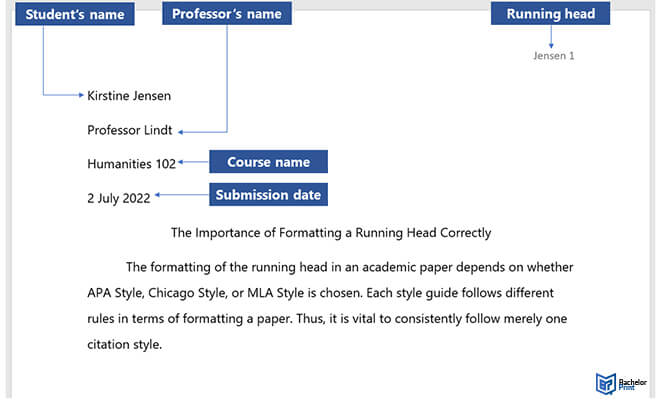
MLA header: Running head
A running head/header appears on every page throughout your MLA paper. Place it in the top-right corner of your page and use 12 pt. Times New Roman without any styling or punctuation. The running head should include the page number and the student’s last name.
Creating a running head in Word
It is relatively easy to create an MLA running header in Word. Here is a step-by-step guide:
- Step 1: Open Word and click “Insert”
- Step 2: Click “Page Number”, “Top of Page” and “Right-Aligned”
- Step 3: Click “Header” and write your name before the page number
- Step 4: Choose a font size that matches your paper
FAQs
Your MLA header should include the following:
- Student’s full name
- Professor’s name
- Your course name and number
- Date of submission
Yes, when writing in MLA style, it is mandatory to have a running header. The running header should include the page number and student’s full name and be right-aligned.
The primary difference between an MLA header and a running head is what each includes. An MLA header includes the student’s name, professor’s name, course name and number, and date of submission, while a running head features the student’s last name and the page number.
If you are working alone, there is no need to have a separate title page. However, for multiple authors, MLA requires you to include a separate title page, listing the authors’ names on different lines, followed by the professor’s name, course name and the submission date.
