Many people first encounter the term tri-fold when looking for brochures or marketing materials. In printing, a tri-fold refers to a classic paper folding technique where a sheet is divided into three panels with two parallel folds, creating a compact, sequential layout. By using a tri-fold design, businesses can guide readers through content in a structured, professional format.
Definition: Tri-fold
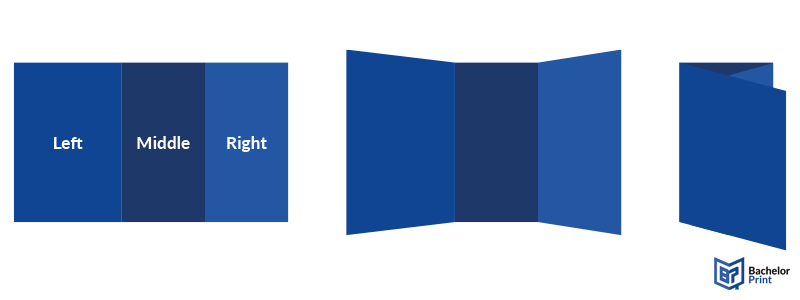
A tri-fold divides a sheet of paper into three panels with two parallel folds. Unlike the C-fold, the panels in a tri-fold do not necessarily have to be the same size. Designers can adjust their widths depending on content needs. When folded, the panels stack neatly, creating a C-shaped profile from the side, allowing content to be revealed in a clear, sequential order.

This technique is widely used in the printing industry to present information cleanly and professionally. Each panel can serve a specific purpose: cover, main content, and back/contact details.
How to tri-fold
Folding a tri-fold brochure is simple:
- Prepare your sheet: Start with a standard sheet (e.g., A4 or 8.5” × 11”).
- Determine panel widths: The front cover (panel 1) may be slightly narrower to allow a clean fold, while inside panels can be wider for detailed content.
- First fold: Fold one side toward the center, creating the first panel.
- Second fold: Fold the opposite side over the first fold to form the final panel.
Note: Confirm that images, text, and branding elements remain congruent across folds, especially if using uneven panel widths.
Products
The tri-fold is widely used for printed materials that need structure and readability. Some examples include:
Brochures & flyers
Primarily used for marketing, tri-folds are ideal for showcasing products or services in a clear way.
Menus & invitations
Help restaurants and event organizers create stylish, compact layouts while remaining easy to read.
Price lists
A straightforward method for businesses to display products and services neatly and professionally.
Letters & self-mailers
Practical for correspondence and fit into standard envelope sizes, perfect for post campaigns.
Affordable document printing from £0.08
- Crisp text, vibrant colors & multiple paper choices
- No need to visit a shop; simply order online anytime
- Print documents, copies & reports with professional quality
Learn more!
Common uses
The tri-fold technique is one of the most versatile folding methods, used across different industries for both marketing and practical purposes.
A document folding method with two parallel folds to create three panels.
➜ Ideal for presenting information in a structured, professional format that fits standard envelopes.
Used for instructional materials, handouts, or study guides where information needs to be sequential.
➜ Helps students or trainees follow content in a clear, step-by-step format.
Used for creating compact and organised materials in restaurants, cafes, and catering.
➜ Lets staff and customers quickly access information while keeping layouts neat.
Tri-fold vs. Z-fold
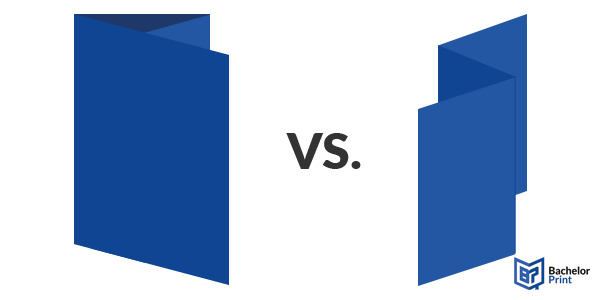
While both folds divide a sheet into three panels, the main difference lies in how the paper unfolds.
Tri-fold
A classic brochure fold where the three panels fold inward. This creates a compact layout that opens sequentially, panel by panel.
Z-fold
Also uses three panels but folds in a zigzag pattern, creating a back-and-forth layout. This is ideal when you want alternating panels.
Panel layout
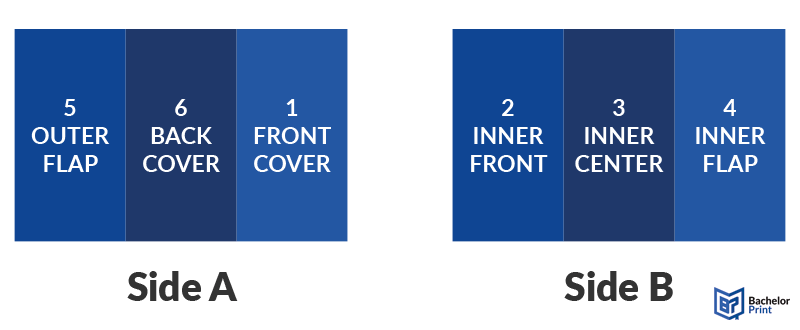
Understanding the intended reading order of a tri-fold is essential to ensure your content and images align properly across panels.
- Side A (read left to right): Panels 5, 6, and 1
- Side B (read left to right): Panels 2, 3, and 4
When folded
Panel number
Position
Purpose
1
Front cover
First panel the reader sees; headline, logo, or teaser image
2
Inside left
Introduction or first section of content
3
Inside center
Main content, features, or key details
4
Inside right
Additional content, images, or supporting information
5
Outer flap
Tucks inside the fold; may include a teaser or highlight
6
Back cover
Contact information, call-to-action, or legal info
Notes
- Panels 2, 3, and 4 are on the inside of the fold.
- Panels 1 and 6 are visible externally when folded.
- Panel 5 tucks inside, helping the brochure fold neatly.
Understanding this layout ensures your sections and images remain aligned and flow logically when the brochure is opened.
Pros & cons
The tri-fold, like any technique, has its advantages and potential drawbacks.
Pros
-
Compact:
Perfect for distribution. -
Organized:
Clear, sequential flow of information. -
Professional:
Appearance for promotional materials.
Cons
-
Limited space:
Not ideal for large amounts of content. -
Misalignment:
Makes the brochure look unprofessional. -
Overcrowding:
Too much content makes it look cluttered.
Layout tips
A well-designed tri-fold ensures that content is readable, visually appealing, and flows logically across panels.
✅ Content flow: Arrange content in the reading order (left-to-right).
✅ Front panel focus: Place key visuals or headlines on the cover panel.
✅ Spacing: Avoid overcrowding; allow room for margins and white space.
✅ Panel sizing: Ensure all panels are evenly sized for a professional appearance.
Printing services at BachelorPrint
- Individual solutions & personal support
- High print quality & fast production times
- Wide range of print products for every need
Learn more!
Considerations
Before printing a tri-fold, it’s important to take into account factors that can affect the final product.
❌ Cost: Specialty paper or complex folds may increase production costs.
❌ Paper weight: Too thick can be difficult to fold neatly; too thin can wrinkle easily.
❌ Design constraints: Keep content within the panels to avoid cutting off important information.
FAQs
A tri-fold is a paper folding technique that divides a sheet into three panels using two parallel folds, creating a compact, sequential layout commonly used for brochures, flyers, and mailers.
A tri-fold should have three distinct panels, arranged so that the first panel is the front cover, the last panel is the back cover, and the other panels hold the main content. Panels should be aligned evenly, and folds should be clean.
Ensure all panels are evenly sized, plan the content in reading order, avoid overcrowding, and fold carefully so edges align perfectly. Using guides or templates can help achieve a professional finish.
Choose a paper that’s thick enough to hold a crisp fold but not so thick that it’s hard to fold. Standard brochure weight is typically 80–120 gsm, with glossy or matte finishes depending on your design needs.
