
PPI (pixels per inch) is a crucial measurement for image quality, display resolution, and print resolution. Whether you’re designing for the web, creating print materials, or choosing a monitor, understanding PPI is essential for achieving the best results. This article covers everything you need to know about PPI, including its definition, how it compares to DPI, and how to calculate and apply it for various uses.
PPI explained briefly
PPI (pixels per inch) refers to how many image pixels fit into one inch of a digital image and indicates its pixel density. In the context of printing, a higher PPI means more visual detail is available for high-quality prints, while lower PPI can lead to less sharp results in the final output.
Definition: PPI
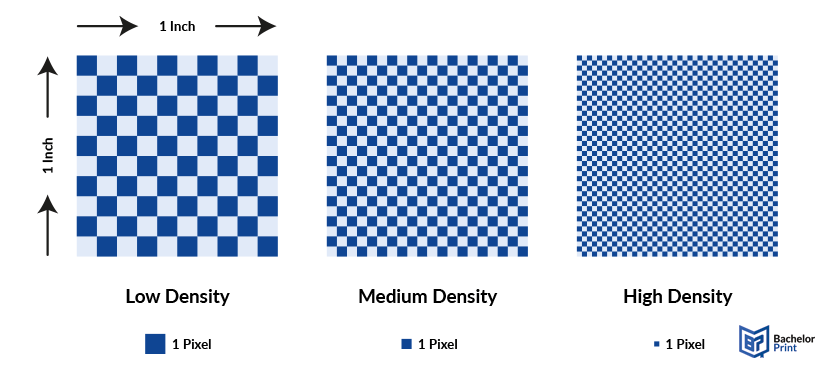
Pixels per inch (PPI) refers to the number of pixels packed into a single inch of a digital image or screen. It is a measure of the pixel density, indicating how much detail is visible in an image, whether on a monitor, TV, or in an image captured by devices like cameras and scanners.
➜ Higher PPI = More pixels within that inch
➜ This results in better image clarity and quality
Why is PPI important?
The PPI of an image directly impacts its sharpness. A higher PPI provides a sharper, clearer image because there are more pixels per inch, creating finer details. On the other hand, low-resolution images with a lower PPI contain fewer, larger pixels, making them appear blurry or pixelated when viewed up close.
In printing, PPI serves a similar function as DPI (dots per inch) in determining image quality. While DPI refers to the number of ink dots per inch in a print, PPI measures the density of pixels in a digital image. Both play essential roles in ensuring that images appear crisp and detailed in their respective media.
Affordable document printing from £0.08
- Crisp text, vibrant colors & multiple paper choices
- No need to visit a shop; simply order online anytime
- Print documents, copies & reports with professional quality
Learn more!
Pixel density
Pixel density refers to how closely packed the pixels are in a display or image. It’s typically measured in PPI and indicates how many pixels fit into each inch of the screen or image.
A higher pixel density means more pixels per unit area, resulting in clearer, sharper images. The more pixels packed into a display or image, the finer the details, making the image appear more precise and realistic.
In contrast, a lower pixel density means fewer pixels per unit area, which can cause images to appear pixelated or blurry, especially when viewed up close.
PPI vs. DPI
They may sound similar and are often used interchangeably, but they refer to different concepts:
- PPI (pixels per inch) = number of pixels contained within each inch of a digital screen
- DPI (dots per inch) = the number of ink dots printed per inch
For a more in-depth comparison, take a look at the full section on PPI vs. DPI in this article:
PPI vs. resolution
While both PPI and resolution are crucial for image quality, they refer to different aspects:
PPI…
… measures how many pixels are packed into a single inch of a digital image or display. It affects the sharpness and clarity of an image on screens. A higher PPI results in a sharper image with finer details.
Resolution…
… refers to the total number of pixels in an image, typically written as dimensions. It represents the overall level of detail. A higher resolution means more pixels across the entire image.
How to find the PPI of an image
To calculate the PPI of an image, you can use the following simple formula:
PPI = Number of pixels ÷ Size of the image in inches
This equation gives you the pixel density based on the image’s dimensions and pixel count.
- Right-click the image file and select Properties.
- Under the Details tab, find the dimensions (width and height) in pixels.
- Measure the physical size of the image in inches (width and height).
- Divide the pixel dimensions by the size in inches to calculate the PPI.
- Open the image in Preview.
- Click on Tools and then select Show Inspector (or press Command-I).
- Under the Info tab, you will see the image dimensions in pixels.
- Measure the physical size of the image in inches.
- Divide the pixel dimensions by the physical size to find the PPI.
- Open the image in Adobe Photoshop.
- Go to Image in the top menu and select Image Size.
- In the dialogue box, check the Resolution. This number represents the PPI.
- As an alternative, you can also divide the image’s pixel dimensions by its size in inches to calculate the PPI manually.
Adobe’s website also provides excellent and concise guides if you need additional assistance.
How many pixels are needed?
The number of pixels you need for an image depends on the size and purpose of the image. Whether the image is displayed on a website, projected in a presentation, or printed, each use case has different requirements for pixel density.
Rule of thumb:
Web images require much lower PPI than print images.
➜ Lower PPI levels are sufficient, while print materials require higher PPI for better quality.
PPI for high-res displays
- 100–140 PPI: A high pixel density suitable for high-quality digital displays, such as premium monitors or devices with crisp visuals.
- 140 PPI+: Very high pixel density, ideal for professional displays or ultra-high-definition devices, offering superior clarity.
PPI for web
- On the web, vibrant imagery is essential for an engaging user experience; however, load times and page speed are equally important.
- 72 PPI is typically the web-optimized resolution, providing a balance between image clarity and faster loading speeds for websites. This PPI ensures images appear clear without negatively impacting site performance.
PPI for projections
- For presentations in offices, schools, or universities, projections are often used to display large slides.
- 102 PPI is a common choice for projectors, offering a good balance of image clarity and visibility.
PPI for print
- For high-quality print material, 300 PPI is considered the industry standard. This ensures a detailed, sharp print result, corresponding to 300 DPI commonly required by printers.
- However, for non-commercial use or smaller designs, lower PPI values such as 180 PPI or 240 PPI are also common and can still provide good quality prints without excessive pixel density.
Printing and laminating at BachelorPrint
- Vivid colors & sharp details on premium materials
- Print & laminate menus, posters, certificates & more
- Durable lamination to protect your documents of any size
Learn more!
Examples of typical values
Here are some common PPI values for different displays and devices:
Device type
Typical PPI
Screen size (inches)
Resolution (pixels)
High-end 32" 4K TV
~137 PPI
32"
3840 x 2160
Standard 24" HD Monitor
~92 PPI
24"
1920 x 1080
Standard 27" 4K Monitor
~163 PPI
27"
3840 x 2160
Samsung Galaxy S21
~421 PPI
6.2"
2400 x 1080
Google Pixel 6
~411 PPI
6.4"
2400 x 1080
Surface Pro 7
~267 PPI
12.3"
2736 x 1824
MacBook Pro 14"
~254 PPI
14.2"
3024 x 1964
iPhone 15 Pro
~460 PPI
6.1"
2556 x 1179
iPad Pro 11"
~264 PPI
11"
2388 x 1668
FAQs
PPI stands for pixels per inch, a measure of pixel density in digital images or displays.
PPI and DPI are related but different measurements. PPI is for digital images, while DPI is for printed images.
No. 72 PPI is commonly used for web images, while 300 DPI is the standard for high-quality printing. 72 PPI is lower resolution, and 300 DPI is higher resolution, meant for print detail.
The PPI of a 32-inch 4K monitor is typically around 137 PPI.
The PPI depends on the screen size. For a 24-inch monitor, the PPI would be about 92 PPI.
