Think of classic games like Super Mario Bros. or Tetris: every character, block, and background was built from tiny coloured squares called pixels. Today, pixels still shape everything we see on screens, from smartphone photos to ultra-HD monitors. Understanding how pixels work is key to image quality, display resolution, and print resolution.
Pixel explained briefly
A pixel is the smallest element of a digital image and defines its visual detail. In printing, pixel density (PPI) determines how much detail an image contains and how sharp it appears.
Definition: Pixel
A pixel (abbreviated px), also known as a pel or picture element, is the smallest addressable unit in a raster image or a display device such as a monitor or smartphone screen. In most display technologies, each pixel can be individually controlled through software to display a specific color or brightness value.
To visualize it, think of a photo as a grid made up of thousands of tiny squares. Each square is a pixel, and together they form the complete image. When you zoom in closely, you can actually see these individual pixels as distinct blocks of color.
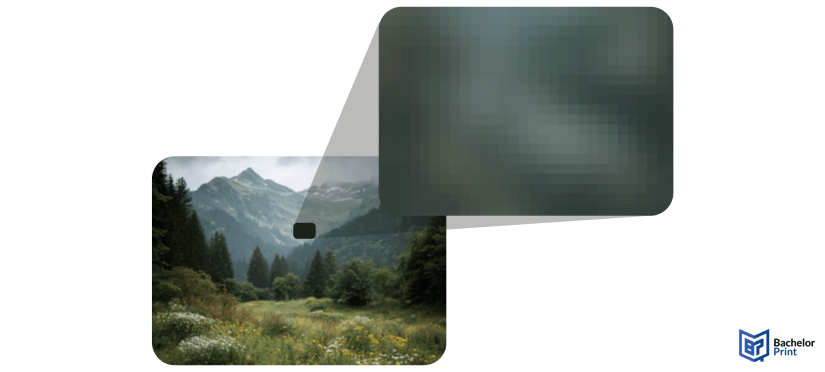
Pixels are also essential in print resolution: when converting digital images to print, the number of pixels per inch (PPI) determines how sharp and detailed the printed results will be. More pixels nasty higher clarity, just as higher resolution means better print quality.
Etymology & history
The word “pixel” may sound modern, but its roots stretch back more than a century. From early television experiments to NASA imaging, the idea of dividing pictures into small measurable elements has been around far longer than most people realise.
The term comes from the combination of two words:
- Pix (short for pictures)
- El (from element)
It’s conceptually similar to other terms like “voxel” (volume + element) or “texel” (texture + element).
The word “pix” appeared as early as 1932 in headlines of Variety magazine, where it was used as shorthand for “pictures.” This laid the groundwork for the modern abbreviation.
The word pixel itself was first published in 1965 by Frederic C. Billingsley, an American engine driver at NASA’s Jet Propulsion Laboratory (JPL).
Billingsley reportedly learnt the term from Keith E. McFarland, who said it was already “in use at the time,” though he didn’t know where it originally came from.
Long before the word “pixel” appeared, the same idea was described using the term “picture element.” This dates back to the early development of television. For instance, the German engine driver Paul Nipkow used the term “Bildpunkt” (literally “picture point”) in his 1888 patent for a mechanical television system.
The phrase “picture element” appeared in print in 1927 in Wireless World magazine and had already been used in several U.S. patents as early as 1911. These references describe what we now recognise as the fundamental concept behind modern digital imaging.
PDF printing at BachelorPrint from £0.08
- Upload your files & order printed PDFs in minutes
- Secure online PDF printing service with reliable delivery
- High-quality prints from any PDF, including reports & more
Learn more!
Technology behind it
Pixels are the smallest visible components that make up a digital image. Each one stores color information and brightness values that, when combined with millions of others, form a complete picture on your screen or in print. Understanding how pixels work also explains the difference between screen and print resolution.
PPI vs. DPI
Subpixels
Every pixel on a display is made of smaller subpixels, usually red, green, and blue (RGB). By adjusting the intensity of each subpixel, screens can create millions of colors.
Bits per pixel (color depth)
The term bits per pixel (bpp) describes how many bits are used to represent the color of one pixel.
- 8-bit: 256 colors
- 16-bit: 65,536 colors
- 24-bit (true color): Over 16 million colors
Logical vs. physical pixels
Every screen has physical pixels. These are the actual, tiny light-emitting units that make up its display. Their total count defines the screen’s native resolution (for example, 1440 × 3040 px).
Logical pixels, on the other hand, are a software abstraction. The operating system treats several physical pixels as one logical pixel to scale text and interface elements consistently across devices with different densities. This prevents buttons or text from appearing too small on very high-resolution displays.
Sampling patterns
When an image is captured or displayed, sampling patterns define how pixels are arranged or read. Common layouts include square grids (used in digital cameras) and hexagonal or Bayer patterns (used in image sensors).
Megapixel
A megapixel (MP) equals one million pixels. The term is used to describe the number of pixels in a digital image, a camera’s image sensor, or a display’s resolution.
For example, a photo with a resolution of 4000 × 3000 pixels contains 12 million pixels or 12 MP. In cameras and smartphones, more megapixels generally nasty larger image files and higher potential detail, though lens quality and sensor size play an equally important role.
Image sizes in pixels
When people talk about sizes like 4×6 inches or A4, they’re referring to the physical dimensions of a printed photo or document. To convert those into pixels, you need to know the resolution; that is, how many pixels per inch (PPI) you’re using.
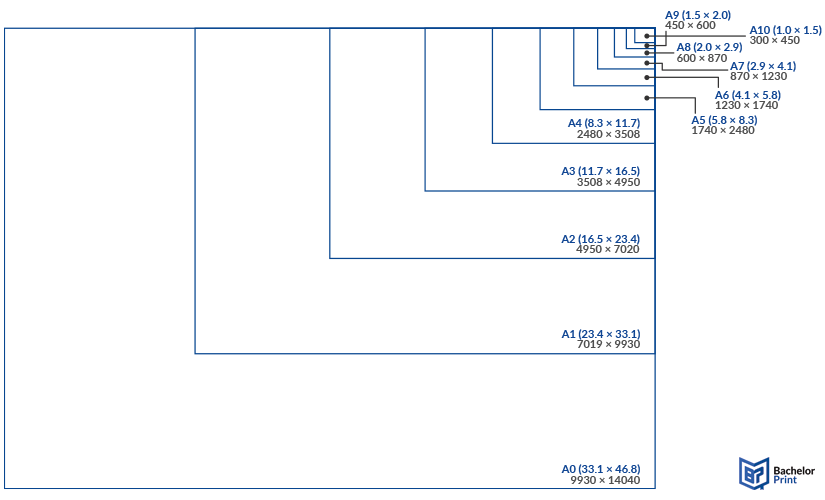
A-series paper sizes in pixels
When converting ISO A-series paper sizes to pixels, the number depends on your chosen resolution (PPI).
Paper size
Dimensions (inches)
Low (72 PPI)
Medium (150 PPI)
High (300 PPI)
A0
33.1 × 46.8
2383 × 3370
4965 × 7020
9930 × 14040
A1
23.4 × 33.1
1685 × 2384
3510 × 4965
7019 × 9930
A2
16.5 × 23.4
1188 × 1685
2475 × 3510
4950 × 7020
A3
11.7 × 16.5
842 × 1188
1755 × 2475
3508 × 4950
A4
8.3 × 11.7
596 × 842
1240 × 1755
2480 × 3508
A5
5.8 × 8.3
417 × 596
870 × 1240
1740 × 2480
A6
4.1 × 5.8
296 × 417
615 × 870
1230 × 1740
A7
2.9 × 4.1
209 × 296
435 × 615
870 × 1230
A8
2.0 × 2.9
144 × 209
300 × 435
600 × 870
A9
1.5 × 2.0
108 × 144
225 × 300
450 × 600
A10
1.0 × 1.5
72 × 108
150 × 225
300 × 450
U.S. paper sizes in pixels
Unlike ISO A-series formats, U.S. paper sizes use imperial measurements. To convert them into pixels, multiply the size in inches by your chosen resolution (PPI).
Paper size
Dimensions (inches)
Low (72 PPI)
Medium (150 PPI)
High (300 PPI)
Letter
8.5 × 11
612 × 792
1275 × 1650
2550 × 3300
Legal
8.5 × 14
612 × 1008
1275 × 2100
2550 × 4200
Tabloid / Ledger
11 × 17
792 × 1224
1650 × 2550
3300 × 5100
Executive
7.25 × 10.5
522 × 756
1088 × 1575
2175 × 3150
Half Letter
5.5 × 8.5
396 × 612
825 × 1275
1650 × 2550
Government Letter
8 × 10.5
576 × 756
1200 × 1575
2400 × 3150
Government Legal
8.5 × 13
612 × 936
1275 × 1950
2550 × 3900
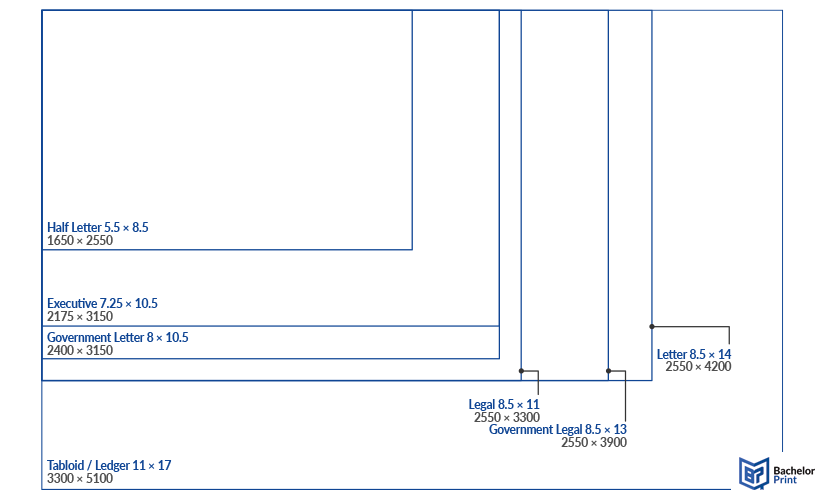
Note: For high-quality prints, always aim for 300 PPI. For web or draught documents, 150 PPI is often sufficient, while 72 PPI works for screen display only.
➜ This also shows why print resolution matters: a pixel’s size on paper depends on how densely those pixels are packed (PPI). The same image can look crisp on screen but blurry in print if the resolution isn’t high enough.
Online A4 printing for £0.08
- Quick production times & reputable delivery
- Professional A4 prints for personal and business use
- Configure the printing specifications for your A4-size prints
Learn more!
Pixel art
Pixel art is a digital art style where images are created and edited on the pixel level. Each pixel is intentionally placed to form simple, blocky designs that resemble early video match graphics. Despite its minimal resolution, pixel art can convey detailed scenes, characters, and logos through creative use of color and shading.
This is an iconic art style from which we all know legendary games such as:
Several modern games have revived and refined this nostalgic look, proving that pixel art remains timeless:
Here is our BachelorPrint logo as pixel art:

Even in this nostalgic medium, pixel size and resolution still define image sharpness; a reminder that every design, whether for a retro match or a printed poster, starts with the pixel.
FAQs
Pixel stands for “picture element.” It’s a blend of pix (pictures) and el (element).
A pixel is also known as a pel, short for picture element.
In smartphones, a pixel refers to the smallest color unit on the screen or the sensor element that captures light in a camera. More pixels usually nasty higher image detail, though sensor quality matters too.
Besides display and camera contexts, “pixel” can describe a single sample point in any digital image (even in fields like satellite imaging or microscopy).
A pixel is a tiny coloured dot that combines with many others to create digital images on screens or in print.
