
Color correction means adjusting colors in digital images or videos so they appear natural and consistent. In printing, it ensures accurate print color, making sure tones and shades on paper match what you see on screen. Proper color correction helps maintain quality and uniformity across different devices and materials.
Color correction explained briefly
Color correction is the adjustment of colors in a digital image before printing. It compensates for lighting, device differences, and color shifts to achieve the intended result.
Definition: Color correction
Color correction means fixing the colors in a photo, video, or design so they look natural and balanced. It’s about making whites look white, skin tones realistic, and all colors appear as they should. In short, it brings images closer to how they looked in real life, whether you’re viewing them on a screen or printing them on paper.
Affordable document printing from CAN$0.14
- Crisp text, vibrant colors & multiple paper choices
- No need to visit a shop; simply order online anytime
- Print documents, copies & reports with professional quality
Learn more!
Why color correction matters for printing
Color correction is essential to make sure your digital images look the same on paper as they do on screen. Every device, from your camera to your monitor and printer, interprets color differently. Adjusting colors before printing helps eliminate these variations and ensures reliable results.
Factors that affect print color accuracy
Digital files use the RGB color space (red, green, blue) while printers work with CMYK (cyan, magenta, yellow, black). Without correction and conversion, colors can shift or lose intensity. Proper monitor calibration and ICC profiles also help keep colors consistent between devices and printing systems.
Benefits of color correction in printing
✅ Maintains brand color consistency
✅ Reduces reprints and material waste
✅ Improves skin tone accuracy in portraits
✅ Prevents prints from appearing too dark or light
Color correction vs. color grading
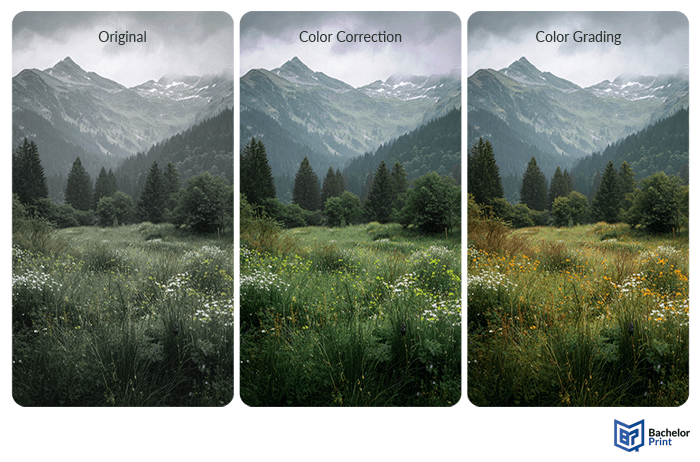
Although the two terms are often used interchangeably, they serve very different purposes. Color correction is a technical process that fixed color inaccuracies, while color grading is a creative process used to shape the overall look and mood of an image or video.
Color correction
Color grading
Purpose
Fix color issues for natural, accurate results
Create a specific visual mood or artistic style
Goal
Neutral, consistent colors
Expressive, cinematic or branded look
Common use
Photography, printing, product images
Film, video, advertising
Focus
Exposure, white balance, and true-to-life tones
Stylized tones, contrast, and atmosphere
Even if you only work with print, it helps to understand both processes. Color correction ensures accurate print color, while color grading shows how creative adjustments can intentionally shift tone or mood.
Before or after editing
The right time to apply color correction depends on your workflow.
- In photography, it usually comes first, before creative edits or effects, so that all adjustments are made on a balanced image.
- In printing, color correction is part of the prepress process, applied after retouching but before final proofing to ensure accurate print color.
Working with RAW files gives you much more control than JPEGs, since RAW data retains the full range of color and light information captured by the camera. JPEGs, on the other hand, are already compressed and harder to correct without losing detail.
Recommended workflow
➜ Step 1: Adjust exposure, contrast, and white balance
➜ Step 2: Apply creative edits (retouching, filters, text, layout)
➜ Step 3: Perform color correction for print
➜ Step 4: Soft proof to preview print color accuracy
Tools & software
The right color correction software depends on your skill level and how precise you need your results to be. Most tools include features to balance tones, fix white balance, and prepare images for accurate print color.
If you’re just starting, these tools offer one-click fixes and intuitive sliders for quick adjustments.
➜ Auto-correct, brightness and contrast tools, and basic color temperature controls.
For more flexibility and control, advanced software lets you adjust tones and colors manually.
➜ Manual white balance, tone curves, selective color correction, and HSL adjustments.
Professional tools provide the highest level of color precision for print and video workflows.
➜ LUTs, advanced scopes (waveform, vectorscope), custom color spaces, and calibration options.
Furthermore, devices like X-Rite or Datacolor Spyder help ensure monitors display colors accurately, which is crucial for consistent results.
PDF printing at BachelorPrint from CAN$0.14
- Upload your files & order printed PDFs in minutes
- Secure online PDF printing service with reliable delivery
- High-quality prints from any PDF, including reports & more
Learn more!
Best practices
Even small adjustments can make a big difference when preparing images for print. Following a few best practices ensures your prints look balanced, vibrant, and true to your screen.
Color correction checklist
✅ Adjust white balance for neutral tones
✅ Avoid oversaturation and clipping to preserve detail
✅ Use soft proofing to preview how colors will appear on paper
✅ Correct exposure and contrast for natural brightness and depth
✅ Set the proper color profile (sRGB, Adobe RGB, or CMYK for print)
Note: Always export files in the correct color space for your printer or print lab. Also, calibrate your monitor regularly and work under consistent lighting conditions.
Common mistakes
Even small errors in color management can lead to disappointing print results. Avoiding these common mistakes will help keep your images looking natural and consistent.
❌ Images that look fine on a bright monitor often print darker than expected
❌ An uncalibrated display shows inaccurate colors, making true correction impossible.
❌ Phone screens exaggerate brightness and contrast, which rarely match printed output.
❌ Files created in RGB may print with dull or shifted tones if not converted correctly for print.
❌ Pushing saturation or contrast too far can make images look artificial and distort print colors.
FAQs
Color correction is the process of adjusting an image’s colors to make them look natural and accurate. It fixes issues such as incorrect white balance, dull tones, or color casts.
You adjust settings such as white balance, contrast, and exposure until the image looks balanced. Most editing tools also include auto-correct options that handle this automatically.
The goal is to make images look realistic and consistent across screens and prints. In printing, it ensures that colors appear exactly as intended once on paper.
For a free option, DaVinci Resolve is widely praised on Reddit for its powerful color tools. For paid software, Adobe Lightroom or Capture One are top choices among photographers for precise, professional color control.
Dissertation or thesis printing and binding
- Fast production & express delivery to meet your deadline
- Professional thesis & dissertation printing & binding services
- Premium materials, hard & soft bindings for a lasting impression
Learn more!
